Take a photo, see the parts
The plate is not one number; bun, patty and sauce sit on their own lines. Tap anything you didn't eat and the total drops.
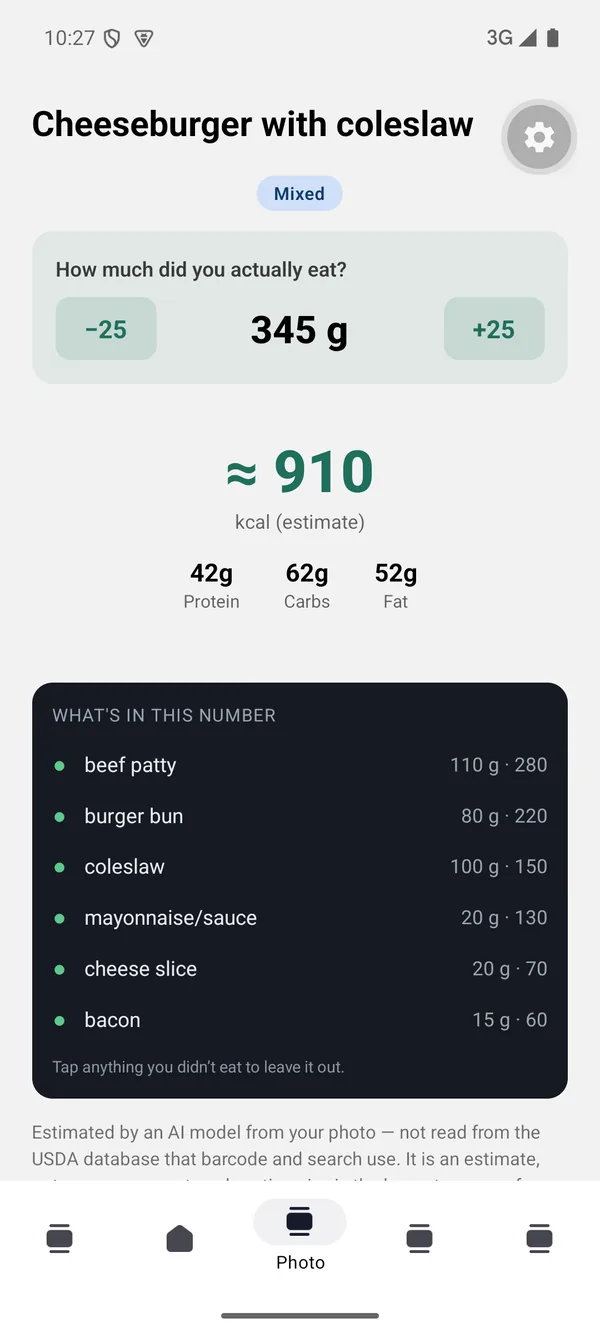
Nutrition tracking for people who care about what they eat. Barcode and search work offline — 441,373 packaged foods and 12,568 prepared dishes live on your phone. Take a photo and the plate is broken into its parts: oil, sauce and dressing on their own lines.
Try it with 9 free photos — no card, nothing that starts charging on its own. Barcode, search, target and the fasting timer are free forever. There are no ads.
Seven of them need no connection. Only the photo feature uses the network — and only when you press the button.
The plate is not one number; bun, patty and sauce sit on their own lines. Tap anything you didn't eat and the total drops.
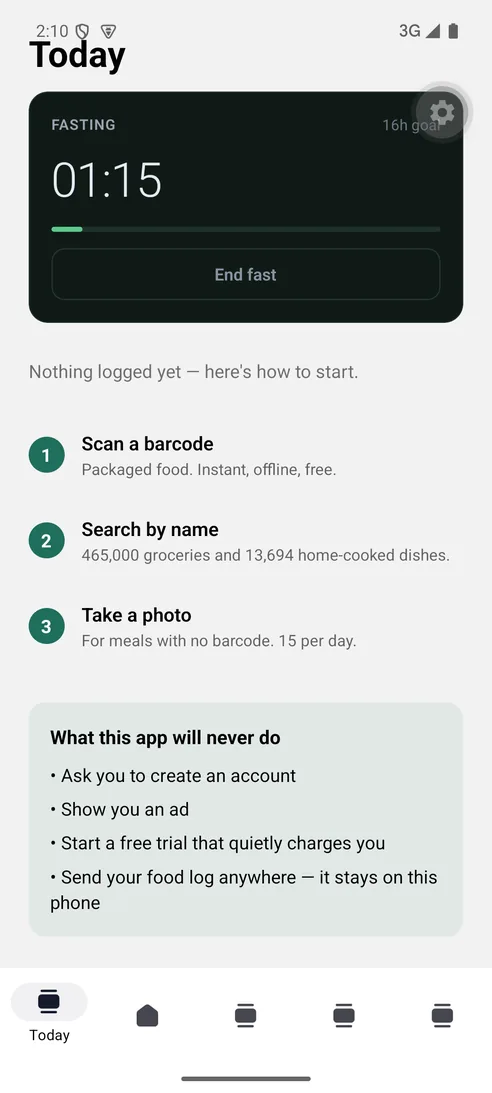
An intermittent fasting timer. No streaks, no advice — it counts, and that is all. It never tells you when to eat. Finish a fast and a short star appears.
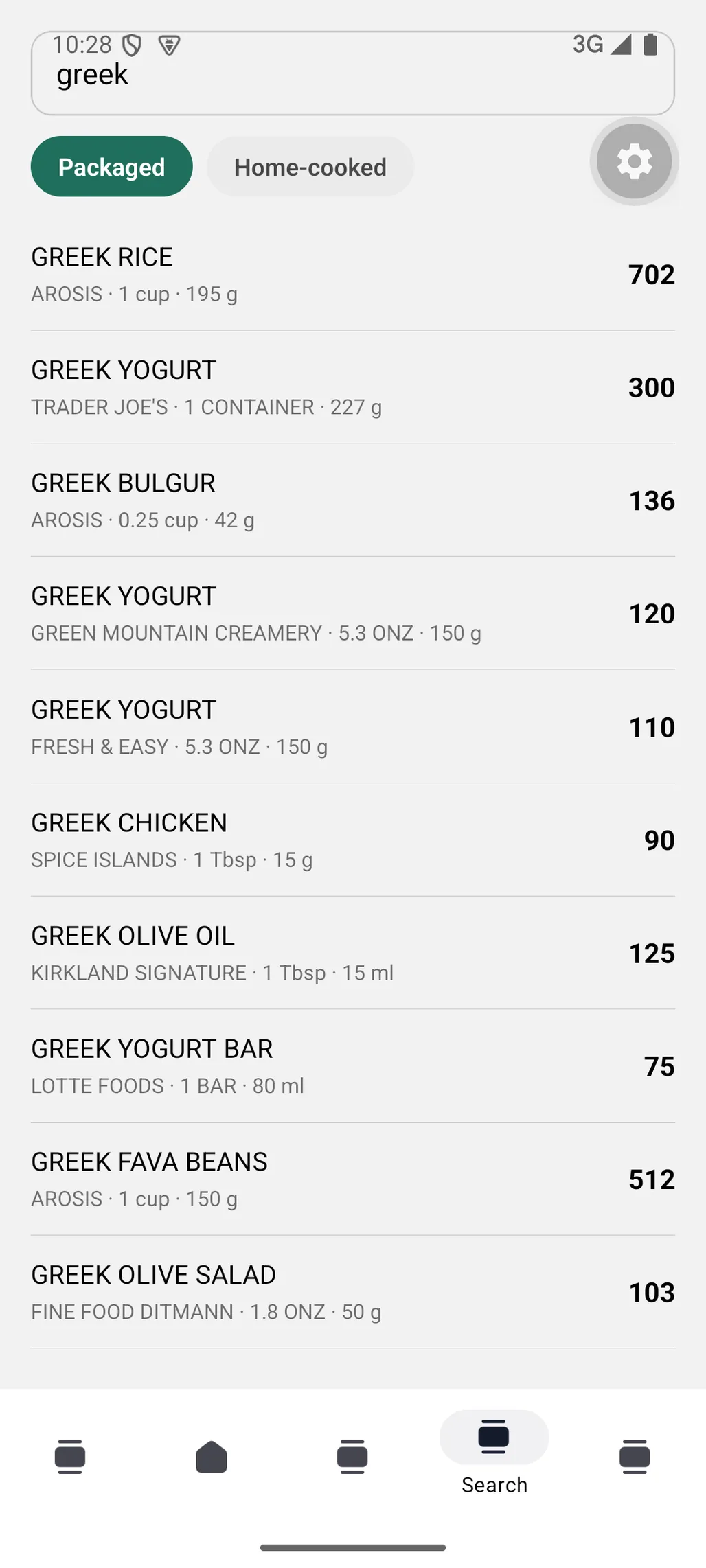
Barcode and search, both offline: 441,373 packaged foods and 12,568 prepared dishes on the phone. A missing value is shown as “—”.
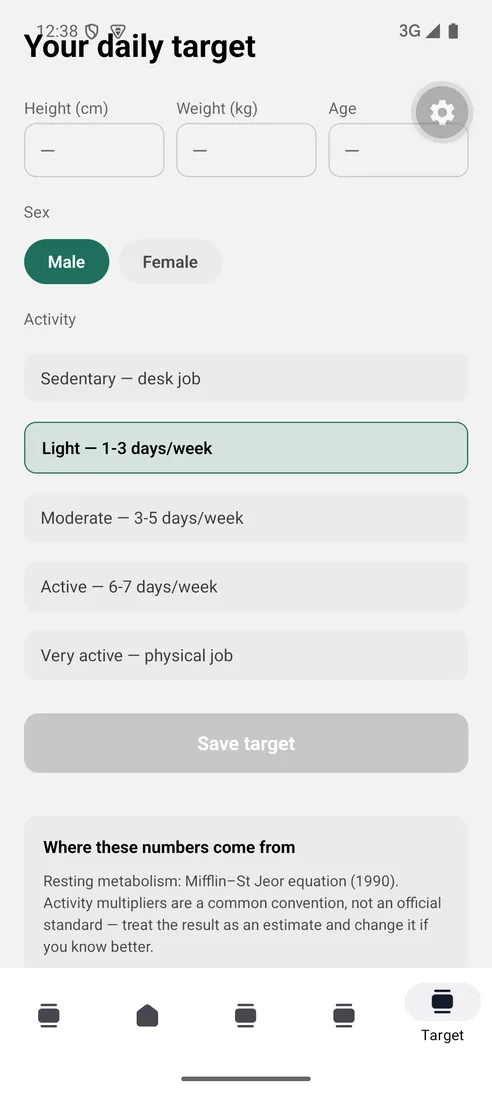
The daily target uses the Mifflin–St Jeor equation. The formula and its year are named on screen — you can see where the number came from.
Tap the mic in Search and say “two eggs and a slice of toast”. Your phone turns the speech into text — the audio never leaves it and is not saved. If your phone cannot do that on the device, the feature stays off; we would rather not send your voice to a server.

Every time you save the Target screen, the weight you typed is kept with that day's date. As weeks pass you get a curve and a single line: “90.3 → 88.4 kg over 4 weeks, −0.46 a week”. No celebration, no streak, no badge — a measurement. We never show the difference between two days: daily weight swings ±1–2 kg with water and salt, a weekly average does not. The chart does not start at zero, so both ends of the scale are printed on screen in numbers.
Add a glass, watch the ring fill. The moment you hit the goal, a big amber star blooms in the middle of the screen and fades. The goal is yours: one tap moves it between 4 and 16 glasses — a habit target, not a prescription. The same reward is waiting on your step goal and on every fast you finish.

Steps, distance and a rough estimate of what you burned — day by day. Not added to your daily target, because the target already includes the activity level you chose; counting the same walk twice would quietly inflate it. Its real job is different: if weeks of walking turn out far above or far below what you picked, you fix the activity level instead. One day misleads; the shape of a week tells the truth.
The features are listed one by one below. The right column says whether each is free or part of the subscription.
| What | How it works | Who |
|---|---|---|
| Barcode scanning | Hold the package up to the camera. 441,373 U.S. grocery products live inside the phone; no connection needed, it works on a plane. | Free |
| Search by name | 12,568 prepared dishes plus every packaged product. Foods whose name says pork or alcohol are not in the app, in search or in barcode scan. Where the source has no value, the field is left empty and shown as “—”. | Free |
| Photo estimate | The plate is not one number; bun, patty and sauce sit on their own lines. Tap what you did not eat and the total drops. This is an estimate and it is shown in the estimate colour. | 9 to try 15 a day |
| Voice logging | Say “two eggs and a slice of bread”. Your phone turns the speech into text. If your phone cannot do that on-device the feature stays off — we do not send audio to a server. | Subscriber |
| Daily target | From height, weight, age, sex and activity level with the Mifflin–St Jeor (1990) equation. The name and year of the formula are printed on the screen. Don't like it? Type your own number. | Free |
| Calories and macros | Daily totals, meal by meal. Unknown values are left out of the sum and you are told how many entries are missing data. | Free |
| Every nutrient | Vitamins and minerals with % Daily Value, based on the FDA reference values used on U.S. food labels. | Subscription |
| Fasting timer | 8 and 12 hours ready to go, or your own length. No streaks, no advice about when to eat — it counts. Finish a fast and a short star appears. | Free |
| Step counter | Steps, distance and roughly how much you burned. On Android we read the daily total from Health Connect (read only — we never write anything back). It is not added to your daily target: your target already includes the activity level you picked. Hit 10,000 and the star blooms. | Today History |
| Target correction | After 14 days: if the median of your walking is above the activity level you picked, it suggests raising your target. It does not suggest lowering it — a step counter cannot see cycling, swimming or weights, and telling a cyclist to eat less because they walked little could leave them hungry. | Subscription |
| Weight tracking | Each save keeps the weight you typed with that day's date. A curve plus your weekly change. Because daily weight moves with water and salt, we use a weekly average, never the gap between two days. | Recording History |
| Water counter | Add a glass and fill the ring. Hit the goal and an amber star blooms in the middle of the screen. The goal is yours — 4 to 16 glasses, one tap. A habit target, not a prescription. | Free |
| Backups | Export your diary as a single file and restore it on a new phone. The file stays with you; it never passes through a server of ours. | Free |
No setup flow, no consent wall. The app opens on your diary; permissions are asked only the first time you use that screen.
Set the target
Height, weight, age, sex, activity level. The number at the top is not a ceiling: it is the point where your weight stays roughly where it is. The same tap also records your weight with today's date.
Add the food
If it has a package, the barcode is fastest. Otherwise search by name, or tap the mic and say it. If the plate is complicated, photograph it.
Fix the portion
Tap the entry and change the grams — the nutrients scale proportionally. On a photo, remove the parts you did not eat.
Close the day
Look at the total. Water is there if you added any, the fasting timer is there if you started one. None of them nags you.
Look at the weeks
The weight curve and the step history are the only things that tell you whether the target is working. After two weeks of readings the weekly change appears.
The same guide is inside the app: tap “How it works · privacy · where the numbers come from” at the bottom of the Today screen. It is not a tour that blocks you on launch — it is a section you open when you want it.
Barcode and search results come from USDA FoodData Central, the US Department of Agriculture's public-domain database. A photo estimate is produced by an AI model; it is an estimate, not a measurement.
Barcode and search are based on USDA data;
a photo number is an estimate.
The app asks for no account. Only the following leaves your phone:
None of it is used for advertising or personalisation; there is no analytics package, no crash reporter and no advertising identifier in the app. Your diary, your target, your searches, your steps, your weight, your water count and what you say out loud never leave your phone.
On Android we read your steps from Health Connect — read only, we never write anything back. The number we read stays on the phone.
Details are in
the privacy policy.
Plans and prices are below.
The clock starts the moment you first open the app. For 7 days every paid feature is open — voice logging, day-by-day history, the full nutrient breakdown, step and weight history. For photos, you get 9 photos in total for the week. No card is asked for, and nothing starts charging on its own. When the 7 days end those features simply close until you choose to subscribe.
$0
$99.99/year
The same 12 months paid monthly comes to $155.88.
$55.89
Works out to $8.33 a month.
Today's number is free, the history is paid. But your entries are kept either way — subscribe whenever you like and the whole history is there, with nothing to re-enter.
$12.99/month
Twelve of these come to $155.88; the yearly plan is $55.89 less.
Barcode and search results are based on USDA FoodData Central, the US Department of Agriculture's public database. User-submitted data is not used.
The database lives inside the app and needs no connection. Packaged foods show brand, portion and calories; vitamins and minerals are part of the subscription.
When the source has no value, you see “—”. The screen also says when a number is a photo estimate rather than a USDA reading.
There is no account. We do not ask for your name, email or phone — there is nowhere to sign up. Your diary, your body details and your searches never leave your phone.